AWS EC2 Instance Comparison
Choosing the Right EC2 Instance
Choosing the right AWS EC2 instance is like picking the right vehicle for a specific trip: you wouldn't use a semi-truck to pick up groceries, nor a moped to move across the country. As of 2026, AWS has expanded its lineup to over 850 instance types, including the latest 8th-generation hardware and high-performance Blackwell GPUs.
AWS EC2 offers multiple families of instances, each optimized for different workloads. Choosing the right type depends on whether your workload is CPU-bound, memory-heavy, storage-intensive, or GPU-accelerated.
Instance Families and Use Cases
| Category | Examples | Best For | Use Case |
|---|---|---|---|
| General Purpose | t3.medium, m6i.large | Balanced CPU & memory | Web servers, dev/test, small DBs |
| Compute Optimized | c6i.large, c7g.large | High CPU per dollar | Batch processing, gaming servers, media transcoding |
| Memory Optimized | r6i.large, x2idn.2xlarge | Large RAM footprint | In-memory DBs, analytics, caching |
| Storage Optimized | i4i, d3 | High IOPS & throughput | Big data, log processing, NoSQL DBs |
| Accelerated Computing | g5.xlarge, p4d | GPU/FPGA acceleration | ML training, HPC, graphics rendering |
Pricing Models
| Model | Commitment | Discount vs On-Demand | Best Use Case |
|---|---|---|---|
| On-Demand | None | 0% | Short-term, unpredictable workloads |
| Spot Instances | Flexible start/stop | Up to 90% | Non-critical, fault-tolerant jobs |
| Reserved (1-year) | 1-year commitment | ~40–50% | Mid-term steady workloads |
| Reserved (3-year) | 3-year commitment | Up to ~72% | Long-term predictable workloads |
Cost Comparison (Full-Time Usage)
When running a workload 24/7 (roughly 730 hours per month), the pricing model you choose is often more important than the instance family itself. A cheap instance on On-Demand can easily cost more than a powerful instance on a Savings Plan.
Here is how the costs break down across the major AWS pricing models as of 2026.
| Instance Type | On-Demand (Monthly) | Reserved 1-Year (Monthly) | Reserved 3-Year (Monthly) |
|---|---|---|---|
| t3.medium | ~$30 | ~$18 | ~$9 |
| c6i.large | ~$61 | ~$36 | ~$17 |
| r6i.large | ~$96 | ~$57 | ~$27 |
| g5.xlarge | ~$720 | ~$430 | ~$200 |
But in reality across the industry most of the workloads are not running 24/7. They scale up infra during regular work hours and scale down during night. So let’s see the cost comparison for 10 hrs/day usage.
Cost Comparison (10 hrs/day Usage)
| Instance Type | On-Demand (Hourly) | Monthly Cost (10 hrs/day) | Reserved 1-Year (Hourly) | Monthly Cost (10 hrs/day) | Reserved 3-Year (Hourly) | Monthly Cost (10 hrs/day) |
|---|---|---|---|---|---|---|
| t3.medium | $0.0416 | $12.5 | $0.025 | $7.5 | $0.012 | $3.6 |
| c6i.large | $0.085 | $25.5 | $0.050 | $15 | $0.024 | $7.2 |
| r6i.large | $0.134 | $40.2 | $0.080 | $24 | $0.038 | $11.4 |
| g5.xlarge | $1.006 | $301.8 | $0.600 | $180 | $0.280 | $84 |
Visualizing Savings
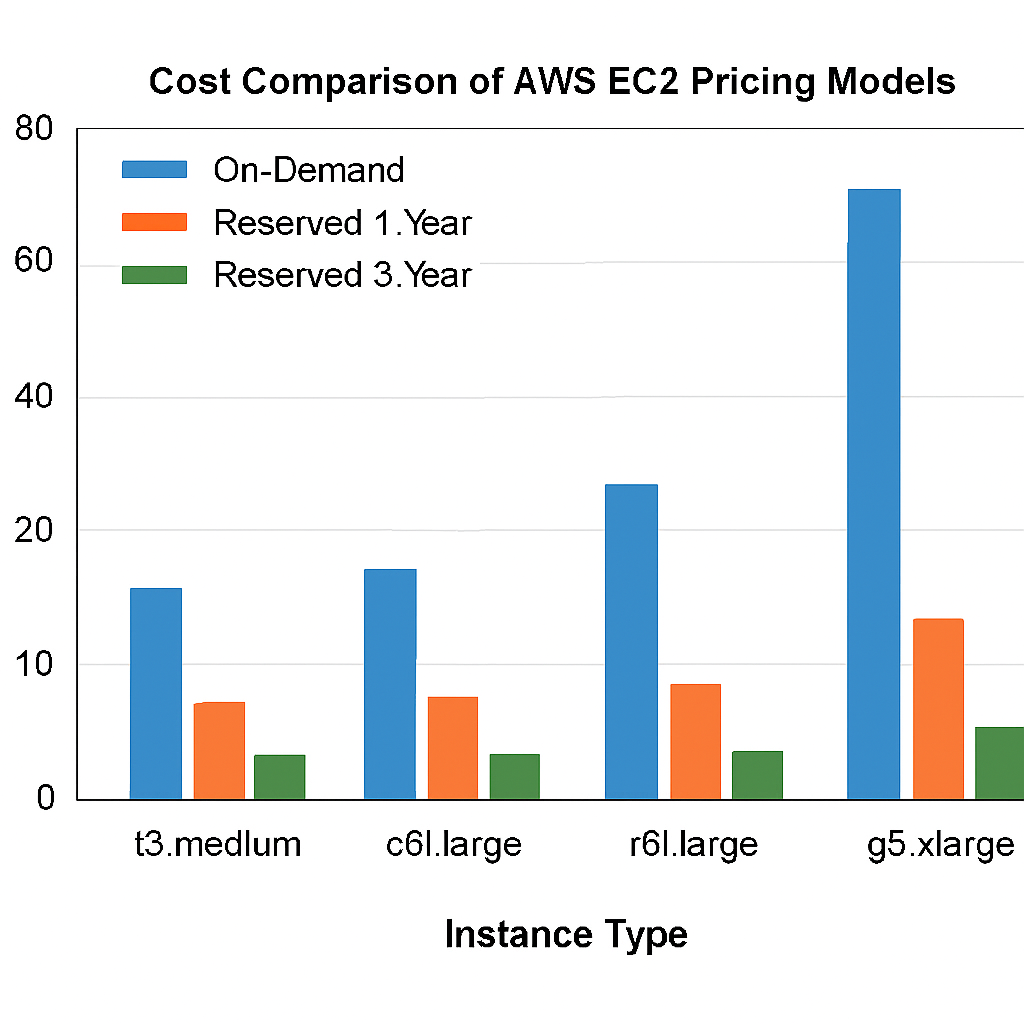
If we plot these costs as a bar graph, the savings become clear: Reserved 1-Year consistently cuts costs by ~40–50% compared to On-Demand, while Reserved 3-Year slashes costs by up to ~70%. For example, a g5.xlarge GPU instance drops from ~$720/month On-Demand to ~$200/month with a 3-Year Reserved plan. The bar graph would show tall On-Demand bars, medium Reserved 1-Year bars, and much shorter Reserved 3-Year bars across all instance types.
Key Insights
On-Demand is flexible and only charges for actual usage, making it ideal for dev/test workloads. Reserved Instances provide significant discounts but lock you into paying regardless of usage. Spot Instances are the cheapest but can be interrupted, requiring fault-tolerant architectures.
Best Practices
Use On-Demand for short-term projects, Spot for batch or CI/CD jobs, and Reserved for long-term predictable workloads. For GPU-heavy tasks, Spot pricing offers massive savings compared to On-Demand.