Kubernetes RBAC for CI/CD Pipelines
Kubernetes RBAC for CI/CD Pipelines: ClusterRole and ServiceAccount Binding
In Kubernetes, securing CI/CD pipelines requires granting only the minimum permissions necessary for automation tools like Jenkins. To deploy Helm charts or standard Kubernetes manifests onto a cluster—whether it is a managed cloud service (like EKS or GKE) or an on-premises deployment—you must authenticate and authorize the external orchestrator. Instead of exposing high-risk cluster-admin credentials, the best practice is to create a dedicated ServiceAccount (or map an IAM role) with limited, explicit verbs and resources, and bind it to the specific Jenkins agent executing the pipeline.
This establishes a secure RBAC (Role-Based Access Control) boundary, ensuring your CI/CD tool has exactly enough privilege to deploy applications without compromising cluster-wide security.
Step 1: Verify Your Current Permissions
Before mapping permissions, you need to check what actions your current user can perform. Kubernetes provides the 'kubectl auth can-i' command to inspect your RBAC privileges.
# Check if you can create deployments in the current namespacekubectl auth can-i create deployments# Check if you can create deployments across all namespaceskubectl auth can-i create deployments --all-namespaces# List all of your allowed permissions in the current namespacekubectl auth can-i --listStep 2: Create the ClusterRole with Least Privilege
We define a ClusterRole that allows only create operations for Deployments, StatefulSets, and DaemonSets.
apiVersion: rbac.authorization.k8s.io/v1kind: ClusterRolemetadata: name: deployment-clusterrolerules: - apiGroups: ["apps"] resources: ["deployments", "statefulsets", "daemonsets"] verbs: ["create"]kubectl apply -f clusterrole.yaml# OR create directlykubectl create clusterrole deployment-clusterrole \ --verb=create \ --resource=deployments,statefulsets,daemonsets.appsStep 3: Map the Permissions Based on Your Scenario
Depending on where your Jenkins agent runs, choose Scenario A (Cloud Agent outside cluster node pools) or Scenario B (On-Premises Jenkins Agent).
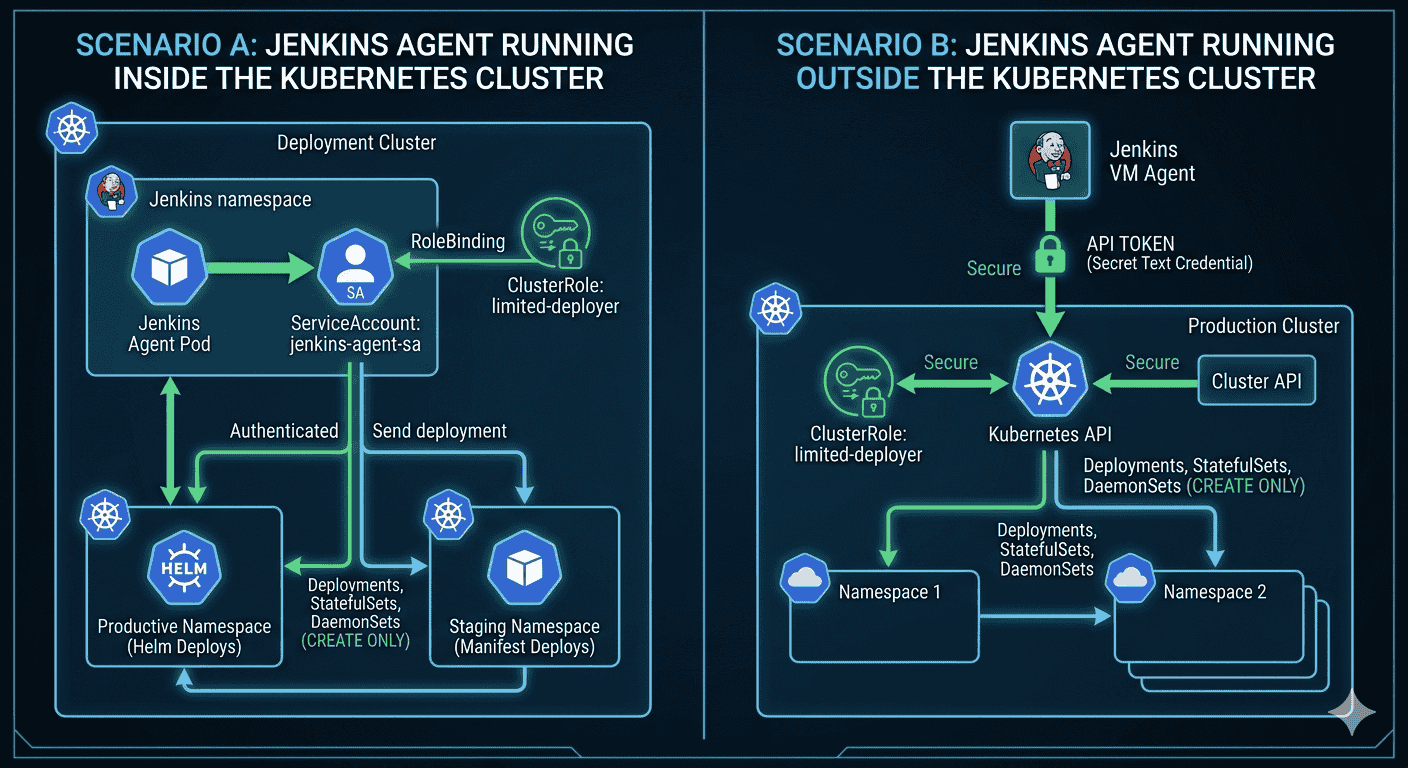
Scenario A: Cloud Agent Outside Cluster Node Pools
For a cloud-hosted Jenkins agent executing external CD pipelines, create a ServiceAccount and bind it to the ClusterRole using a RoleBinding scoped to the target namespace.
apiVersion: v1kind: ServiceAccountmetadata: name: cloud-cicd-token namespace: your-namespace---apiVersion: rbac.authorization.k8s.io/v1kind: RoleBindingmetadata: name: cloud-deployment-rolebinding namespace: your-namespacesubjects: - kind: ServiceAccount name: cloud-cicd-token namespace: your-namespaceroleRef: kind: ClusterRole name: deployment-clusterrole apiGroup: rbac.authorization.k8s.ioSince it is outside the node pools, generate a long-lived secret token manually to pass back to Jenkins credentials.
apiVersion: v1kind: Secretmetadata: name: cloud-cicd-token-secret namespace: your-namespace annotations: kubernetes.io/service-account.name: "cloud-cicd-token"type: kubernetes.io/service-account-token# Extract token for Jenkins 'Secret text' credentialskubectl get secret cloud-cicd-token-secret -n your-namespace -o jsonpath={.data.token} | base64 --decodeScenario B: On-Premises Jenkins Agent
For an on-premises Jenkins agent deploying across network boundaries, define a localized ServiceAccount and RoleBinding inside the target cluster namespace.
apiVersion: v1kind: ServiceAccountmetadata: name: onprem-cicd-token namespace: your-namespace---apiVersion: rbac.authorization.k8s.io/v1kind: RoleBindingmetadata: name: onprem-deployment-rolebinding namespace: your-namespacesubjects: - kind: ServiceAccount name: onprem-cicd-token namespace: your-namespaceroleRef: kind: ClusterRole name: deployment-clusterrole apiGroup: rbac.authorization.k8s.ioSecure on-premises workflows by bundling the cluster endpoint data and token directly into a local Kubeconfig file residing on the file system of the on-prem Jenkins worker node.
apiVersion: v1kind: Configclusters:- cluster: certificate-authority-data: <BASE64_CLUSTER_CA> server: https://<internal-cluster-ip>:6443 name: target-clustercontexts:- context: cluster: target-cluster namespace: your-namespace user: onprem-cicd-token name: target-contextcurrent-context: target-contextusers:- name: onprem-cicd-token user: token: <ONPREM_SERVICE_ACCOUNT_TOKEN>Step 4: Verify Permissions
Always test RBAC before plugging into your pipeline. Use 'kubectl auth can-i' to impersonate the scenario-specific ServiceAccount and check permissions.
# Replace token name based on Scenario (cloud-cicd-token OR onprem-cicd-token)kubectl auth can-i create deployments \ --as=system:serviceaccount:your-namespace:cloud-cicd-token \ -n your-namespacekubectl auth can-i create statefulsets \ --as=system:serviceaccount:your-namespace:cloud-cicd-token \ -n your-namespacekubectl auth can-i create daemonsets \ --as=system:serviceaccount:your-namespace:cloud-cicd-token \ -n your-namespaceAlternative: Authenticating dynamically via gcloud CLI
If your target cluster is Google Kubernetes Engine (GKE), you can bypass manual ServiceAccount token management entirely. By allowing your Jenkins agent to authenticate via an IAM Workload Identity or a Service Account Key, it can run 'gcloud container clusters get-credentials' to dynamically generate a secure, short-lived Kubeconfig before executing Helm or kubectl commands.
Scenario Cloud Agent (Compute Engine / VM Outside Node Pools)
If your cloud agent is a standard VM inside Google Cloud but outside the GKE node pools, attach a Google Cloud IAM Service Account directly to the VM instance. Ensure this IAM account has the 'GKE Cluster Developer' role. Your pipeline step requires zero hardcoded credentials:
Conclusion
By executing this strategy across both cloud VM and on-premises environments, we enforce least privilege for CI/CD pipelines. This ensures automation can safely deploy workloads without risking cluster-wide access. For real-world pipelines, consider adding 'update' and 'delete' verbs if rolling updates or cleanup are required.