Creating and Using Secrets in AWS with Kubernetes (EKS)
🔐Creating and Using Secrets in AWS with Kubernetes (EKS)
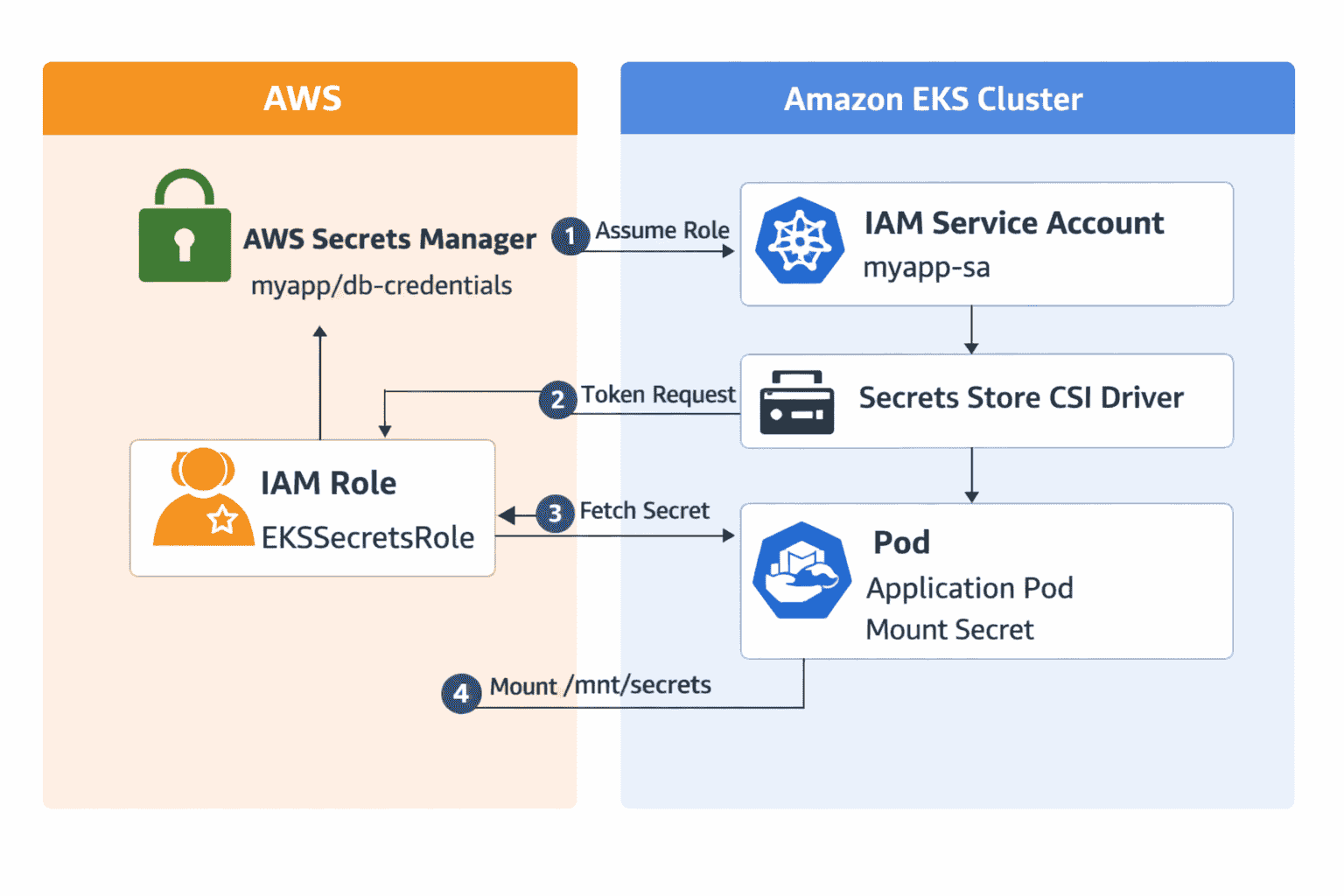
To securely manage secrets in AWS and use them in Kubernetes (EKS), the recommended approach is to store sensitive data in AWS Secrets Manager and then expose them to Pods via the Kubernetes Secrets Store CSI Driver with the AWS Secrets and Configuration Provider (ASCP). This ensures centralized management, fine-grained IAM-based access, and automatic rotation support
Step 1: Create a Secret in AWS Secrets Manager
- Go to AWS Console → Secrets Manager → Store a new secret.
- Select secret type (e.g., database credentials, API key).
- Enter key-value pairs such as username=admin, password=StrongPass123.
- Choose an encryption key (default AWS-managed KMS key or custom CMK).
- Name the secret (e.g., myapp/db-credentials) and save.
Step 2: Configure IAM Permissions
Create an IAM policy that allows access to the secret using secretsmanager:GetSecretValue. Attach this policy to an IAM role that will be assumed by Kubernetes Pods via IRSA.
{ "Version": "2012-10-17", "Statement": [{ "Effect": "Allow", "Action": ["secretsmanager:GetSecretValue"], "Resource": "arn:aws:secretsmanager:region:account-id:secret:myapp/db-credentials-*" }] }Step 3: Enable IRSA (IAM Roles for Service Accounts)
- Associate your EKS cluster with an OIDC provider using eksctl utils associate-iam-oidc-provider.
- Create an IAM role with a trust policy allowing the OIDC provider.
- Annotate the Kubernetes Service Account with the IAM role ARN.
eksctl utils associate-iam-oidc-provider --cluster my-cluster --approvekubectl annotate serviceaccount myapp-sa eks.amazonaws.com/role-arn=arn:aws:iam::account-id:role/EKSSecretsRoleStep 4: Install Secrets Store CSI Driver and AWS Provider
- Deploy the CSI driver using kubectl apply -f secrets-store-csi-driver.yaml.
- Install AWS Secrets and Configuration Provider (ASCP).
kubectl apply -f https://github.com/aws/secrets-store-csi-driver-provider-aws/releases/latest/download/provider-aws-installer.yamlStep 5: Create a SecretProviderClass
Define which AWS secret to mount inside your Pod using the SecretProviderClass resource.
apiVersion: secrets-store.csi.x-k8s.io/v1kind: SecretProviderClassmetadata: name: aws-secretsspec: provider: aws parameters: objects: | - objectName: "myapp/db-credentials" objectType: "secretsmanager"Step 6: Mount Secret in a Pod
Update your Pod specification to mount the secret using the CSI driver.
apiVersion: v1kind: Podmetadata: name: demo-podspec: serviceAccountName: myapp-sa containers: - name: app image: nginx volumeMounts: - name: secrets-store mountPath: "/mnt/secrets-store" readOnly: true volumes: - name: secrets-store csi: driver: secrets-store.csi.k8s.io readOnly: true volumeAttributes: secretProviderClass: "aws-secrets"Step 7: Optional — Sync AWS Secrets to Kubernetes Secrets
You can configure the CSI driver to sync AWS secrets into native Kubernetes Secrets for use as environment variables.
spec: secretObjects: - secretName: db-secret type: Opaque data: - objectName: "myapp/db-credentials" key: "password"Step 8: Verify Secret Mount
- Run kubectl exec demo-pod -- ls /mnt/secrets-store to verify secret files.
- Inspect contents using cat /mnt/secrets-store/myapp_db-credentials.
Security and Best Practices
- Use IRSA for least-privilege access instead of node IAM roles.
- Enable automatic rotation in AWS Secrets Manager.
- Restrict access to secrets via IAM policies.
- Avoid hardcoding secrets in manifests or environment variables.
Workflow Summary
AWS Secrets Manager → IAM Role → Service Account (IRSA) → Secrets Store CSI Driver → Pod Mount. This ensures secure, scalable, and auditable secret management across your EKS workloads.
⚠️ Key Considerations
- Automatic Rotation: AWS Secrets Manager supports rotation; CSI driver ensures Pods always get updated values.
- Security Best Practice: Use IRSA for least-privilege access instead of node IAM roles.
- Limitations: AWS Fargate node groups don’t support Secrets Store CSI Driver.