Understanding Amazon Elastic Kubernetes Service (EKS)
Understanding Amazon Elastic Kubernetes Service (EKS)
Amazon Elastic Kubernetes Service (EKS) is a fully managed service designed to simplify the deployment, management, and scaling of Kubernetes containers on AWS. By offloading the heavy lifting of cluster maintenance to AWS, EKS allows organizations to focus on building applications rather than managing complex infrastructure.
Key Features and Benefits
Amazon EKS bridges the gap between standard Kubernetes and the robust AWS ecosystem through several core capabilities:
- Managed Control Plane: AWS handles the provisioning, scaling, and patching of the Kubernetes control plane across multiple Availability Zones (AZs) to ensure High Availability.
- Seamless AWS Integration: EKS integrates natively with AWS IAM for access control, Amazon VPC for network isolation, and Amazon CloudWatch for monitoring.
- Flexible Compute Options: Run workloads on Amazon EC2 for full control or AWS Fargate for a serverless experience.
- Upstream Compatibility: Fully compatible with standard Kubernetes, enabling easy migration and use of existing community tools.
- Security & Encryption: Built-in features including automatic encryption of control plane data and integration with AWS KMS.
Amazon EKS Deployment Models
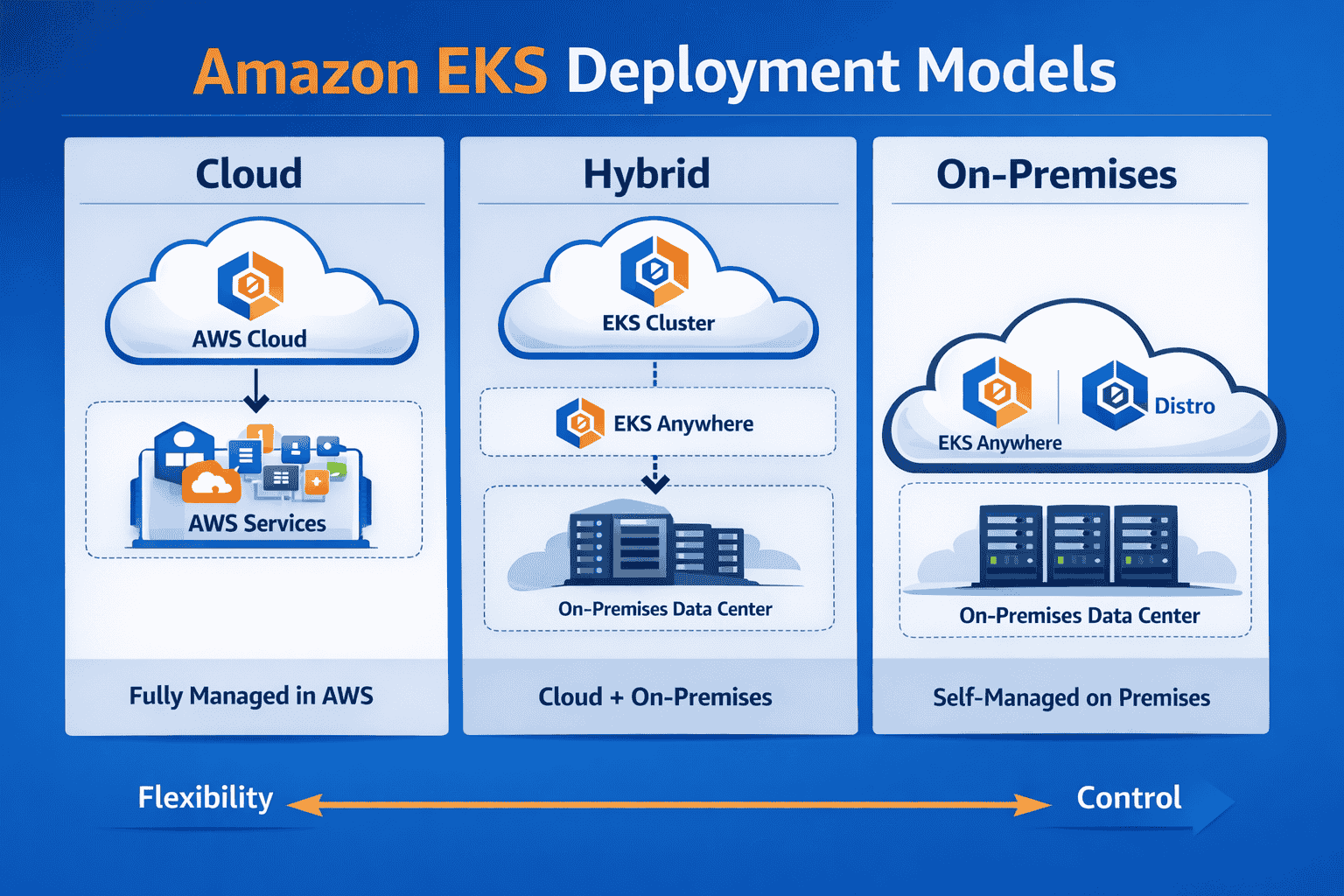
- Cloud (Fully Managed in AWS): EKS cluster runs entirely in AWS Cloud; AWS manages control plane, scaling, and updates while you handle worker nodes and workloads.
Use case: Ideal for startups or SaaS platforms needing rapid CI/CD pipelines, integrated monitoring with CloudWatch, and seamless scaling without heavy ops overhead. - Hybrid (Cloud + On-Premises): Combines EKS in AWS Cloud with EKS Anywhere on local servers; ideal for data residency or partial on-prem workloads.
Use case: Enterprises running sensitive workloads locally (e.g., financial data) while leveraging AWS for customer-facing microservices, enabling unified monitoring with Prometheus + Grafana across environments. - On-Premises (Self-Managed): Uses EKS Anywhere or EKS Distro to run Kubernetes clusters in your own data center; offers full control but higher operational overhead.
Use case: Organizations with strict compliance (e.g., healthcare or government) that need air‑gapped deployments, custom networking, and advanced observability pipelines managed entirely in-house. - Flexibility vs Control: Moving from Cloud to On‑Premises increases customization and control but reduces AWS‑managed convenience.
Use case: Decision point for DevOps teams balancing speed (Cloud) vs compliance and customization (On‑Premises).*
When setting up your cluster, the method you choose depends on your team's expertise and the level of control required over the underlying infrastructure.
| Method | Who Manages Compute | Flexibility | Operational Overhead | Best Use Case |
|---|---|---|---|---|
| Console | User chooses EC2/Fargate | Medium | Medium | Quick setup, testing |
| EC2 Worker Nodes | User (self or managed groups) | High | High (self-managed) / Medium (managed groups) | Custom workloads, GPUs, steady traffic |
| Fargate | AWS (serverless) | Low | Low | Serverless, bursty workloads, minimal ops |
Key Considerations
When you create an EKS cluster, the main difference between Console, EC2 and Fargate is how much of the underlying infrastructure you manage yourself versus how much AWS automates for you:
1. AWS Console (Guided Setup)
- You manage: The architectural choices—cluster name, version, networking, and IAM roles.
- AWS automates: The Kubernetes control plane (masters, etcd, and scaling).
- Balance: You still need to decide whether to attach EC2 nodes or Fargate profiles, but the initial setup is guided.
2. EC2 Worker Nodes (Maximum Control)
- You manage: The physical/virtual EC2 instances (patching, scaling, instance types, and custom AMIs).
- AWS automates: The Kubernetes control plane and basic integration with EC2.
- Balance: High flexibility for specialized hardware (GPUs), but significant operational overhead for server maintenance.
3. AWS Fargate (Maximum Automation)
- You manage: Just the Kubernetes pods and deployment manifests.
- AWS automates: All compute provisioning, scaling, and underlying server management.
- Balance: Lowest operational overhead possible, but limited flexibility (no custom AMIs or specialized hardware).
Conclusion
Amazon EKS provides a robust, enterprise-grade foundation for container orchestration. Whether you prioritize granular control or the simplicity of serverless, EKS ensures your environment is secure and scalable.